A cable into your home, a small fibre box and your Wi-Fi router. We’ll agree where everything goes with you before we start.
Most visits take 1–2 hours
Someone 18 or over needs to be home
Route agreed with you before work begins
The route into your home
What type of home do you live in?
Choose the picture that looks closest to your home. We’ll show you what to expect.
Not sure which applies?
For a house, your existing BT phone cable is a useful guide: fibre will very likely follow the same overhead or underground route. You can explore any option here. Your engineer confirms what’s possible and agrees the route with you.
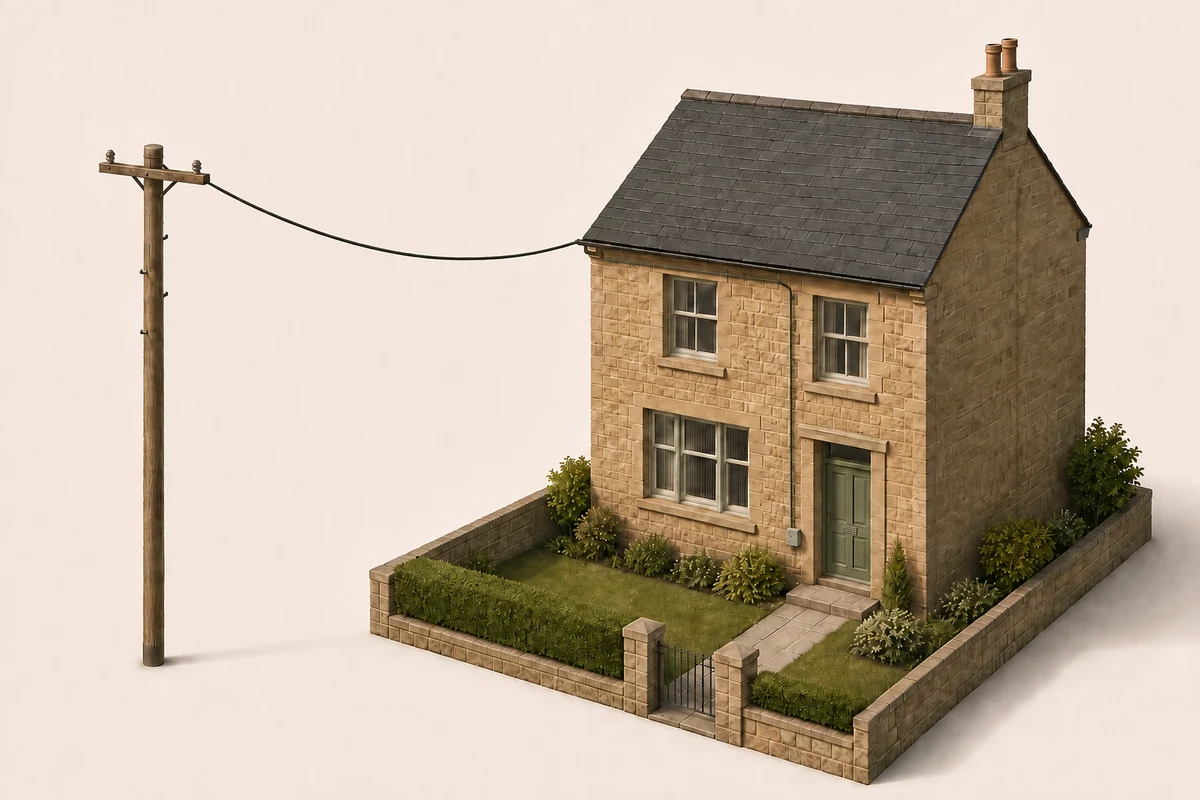
From the pole to your home
Overhead fibreA cable runs from the pole to an attachment point on your home.
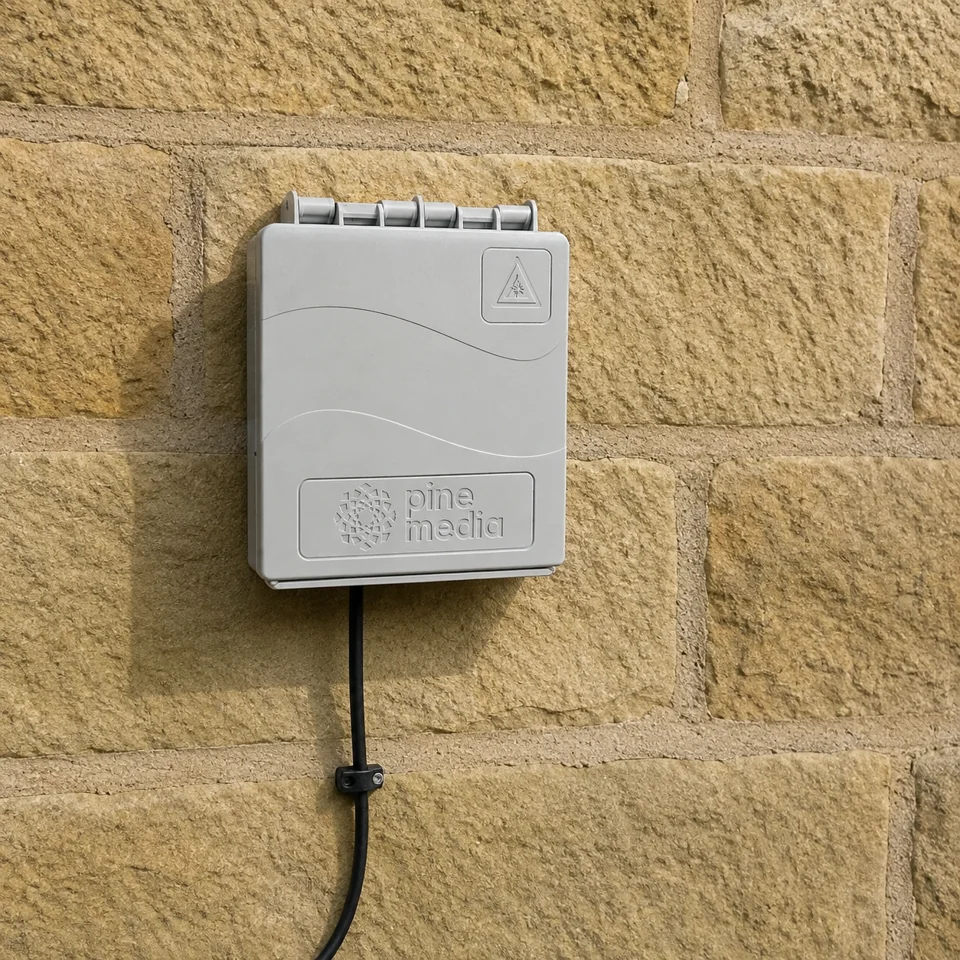
A small outside boxThe cable follows the wall to the grey connection box. It protects the fibre join before the cable enters your home.
A neat entry insideA small, sealed wall entry takes fibre to the indoor box near power. We then connect your router.
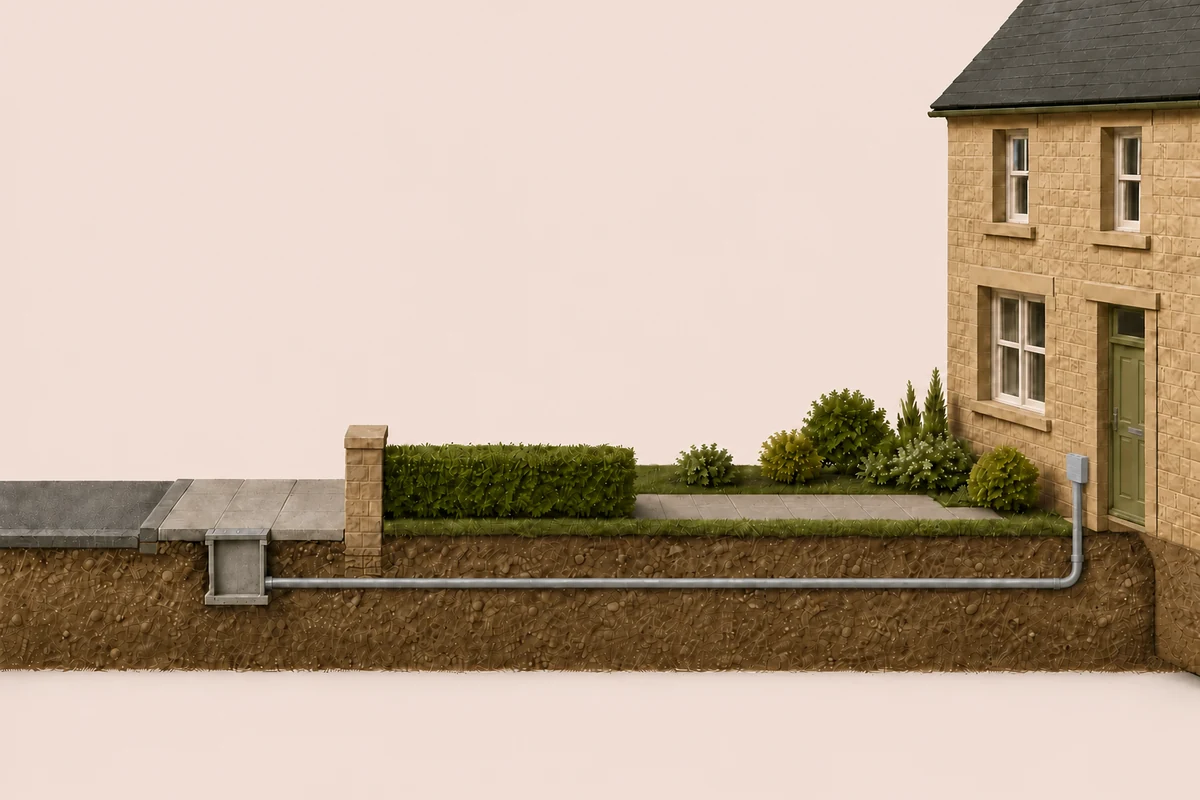
Through an existing underground duct
From the public footwayWe feed fibre through a suitable existing duct from the chamber in the public footway to your outside wall.
A small outside boxThe duct emerges against the wall beneath protective capping. The small grey box above protects the fibre join.
A neat entry insideA small, sealed wall entry takes fibre to the indoor box near power. We then connect your router.
From the corridor into your flat
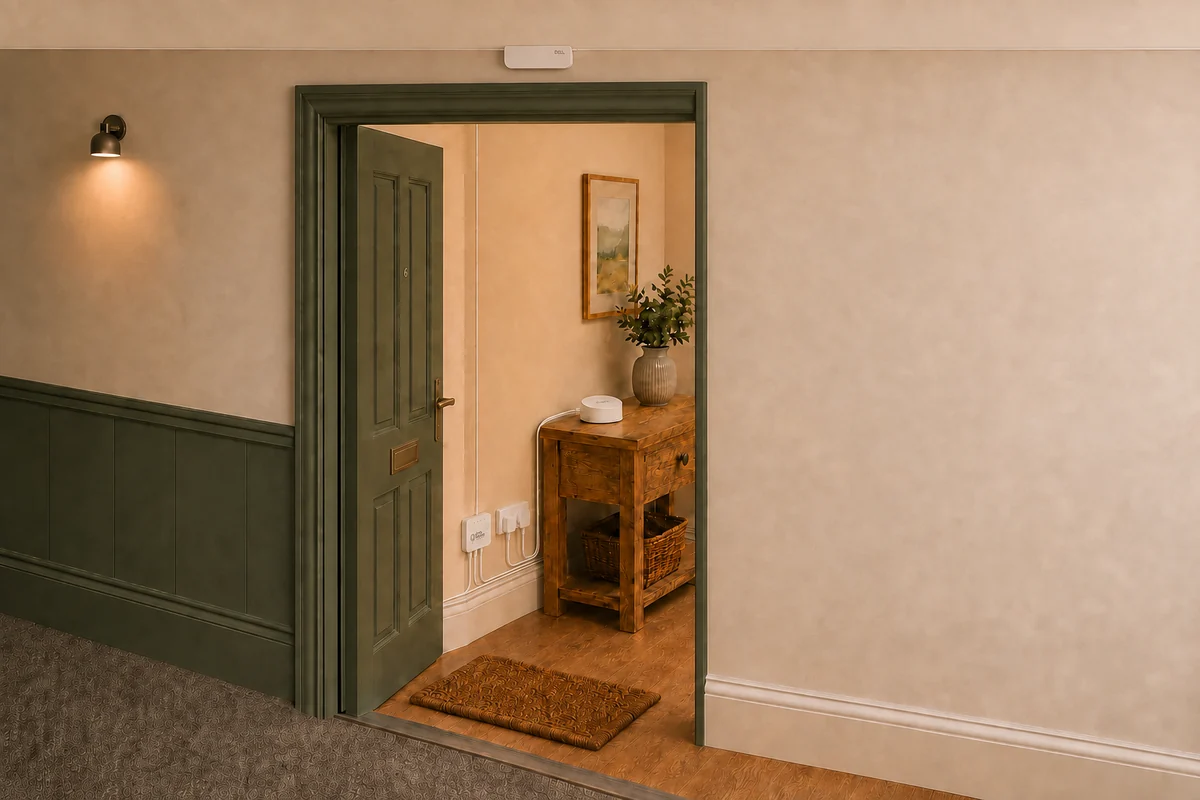
Discreet corridor fibreIn connected buildings, fine fibre follows the ceiling-to-wall seam to a small box above your door.
A concealed entry at ceiling levelFibre enters through a small, grommeted hole behind the box above your door, hidden from the corridor.
Down the corner, along the skirtingFibre follows the wall corner and skirting to the first suitable power socket. We fit the indoor box and connect your eero.
The outside connection box
This small grey box, called a CSP, protects the fibre join outside your house. From here, fibre passes through a neatly sealed wall entry to the indoor box. It does not need a power socket.
Illustrative equipment and positioning. Your engineer agrees the details with you.
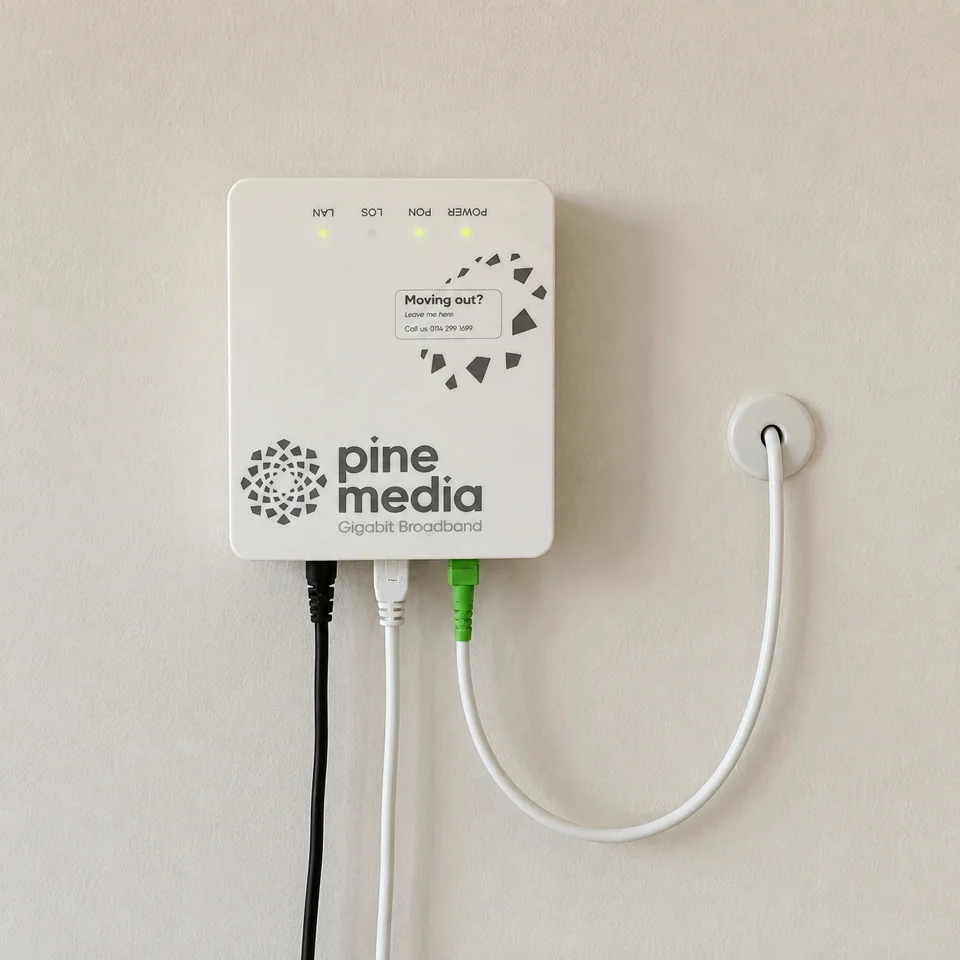
Fibre from the outside box passes through a small, neatly sealed wall entry. Inside, a gentle cable loop connects to the green fibre connector on the ONT. Your engineer agrees the entry point and indoor cable route with you.
A white Ethernet cable connects the ONT to your eero router. Each has its own white power supply, so we need power for both devices. The grey connection box stays outside.
Illustrative equipment and positioning, shared by overhead and underground house installations.
The box above your flat door
This slim white point-of-entry box, or POE, connects your flat to the corridor fibre. The corridor fibre follows the ceiling-to-wall seam, continuing into one side and out of the other. A separate fibre enters your flat through a small, grommeted hole hidden behind it at ceiling level. Inside, it runs down the wall corner and along the skirting to the ONT near power. The POE itself does not need power.
Illustrative equipment and positioning. Your engineer agrees the details with you.
On the inside, the fibre emerges through a small, neatly grommeted entry above your door. It runs vertically in the corner where the two walls meet, then follows the skirting to the ONT near a suitable power socket. The corridor box stays on the other side of the wall.
Illustrative entry and positioning. Your engineer agrees the route with you.
The indoor fibre box
The thin incoming fibre connects to the ONT through the green connector. The ONT also needs a power socket. In a flat, we usually fit it by the first suitable socket along the skirting route. A white Ethernet cable connects it to your eero router, which provides your Wi-Fi. The two white power plugs shown supply the ONT and eero separately.
Illustrative equipment and positioning. Your engineer agrees the details with you.
Your Pine Media eero router
Your eero connects to the ONT by Ethernet and provides Wi-Fi for your devices. It needs its own power socket. One mesh-capable eero is included: eero 6+ as standard, or eero 7 with 2 Gbps plans and above. Additional eeros for extra coverage are available through the paid Full House Wi-Fi add-on.
Illustrative equipment and positioning. Your engineer agrees the details with you.
Your engineer visit
First we agree. Then we connect.
You don’t need to install anything yourself. Here’s what your engineer will do.
1
Walk through the route
We agree the cable route and where the fibre box and router will go.
2
Bring the fibre inside
We fit the cable and equipment, then seal any new wall entry neatly.
3
Test your connection
We test the connection and help get your devices online before we leave.
A closer look
What stays in your home?
A small fibre box on the wall, connected to your eero Wi-Fi router.
Outside · houses
The connection box
The grey CSP protects the fibre join outside a house. Flats use the small box above the door instead.
Inside · near power
The indoor fibre box
The wall-mounted ONT receives your fibre connection. It needs power and connects to your eero by Ethernet.
One eero router, included and set up.
One eero 6+ as standard, or one eero 7 with 2 Gbps plans and above. Your engineer helps find a suitable position and sets it up.
Someone aged 18 or over needs to stay for the full visit.
Think about power and Wi-Fi
The ONT and router each need power. A central, open position is ideal for your router; your engineer will help choose what works.
Clear the route
Clear access to the entrance, wall entry and nearby sockets. For houses, we may also need access to the outside wall.
Renting? Arrange permission
Have written permission from your landlord or letting agent before the visit.
The practical details
Your questions, answered.
How long does the installation take?
Most installations take 1–2 hours. Your engineer arrives within your confirmed appointment slot. Some properties need additional work; we will explain what is needed and any next steps.
Will you drill a hole in my wall?
A small hole is usually needed to bring the fibre inside. We agree the entry point with you before starting and seal it neatly afterwards. For a flat with our fibre already in the shared corridor, the grommeted entry is usually hidden behind the small box above your front door at ceiling level. Inside, the cable drops down the wall corner and follows the skirting to the first suitable power socket.
Will you need to dig up my garden?
Where suitable existing ducts are available, we use them to bring the fibre underground. If a duct is blocked or the usual route cannot be used, your engineer will explain any additional work needed. An overhead connection comes from a nearby telegraph pole.
Will my installation look like the pictures?
The illustrations show typical routes and Pine Media equipment. Models and positions can vary. Your engineer confirms what is suitable for your property and agrees the route with you before starting.
What happens before my appointment?
Check your postcode to see available plans, choose your speed and any add-ons, and complete your order online. There are no credit checks. Our team confirms your order and arranges an installation date with you. If you are switching through One Touch Switch, we also coordinate the switch with your old provider.
Can I reschedule my installation?
Yes. Reschedules are free up to 15:00 on the working day before your appointment. Contact our team and we will find a new slot that works for you.
Do I need to be home?
Yes. Someone aged 18 or over needs to be present for the full installation so the engineer can agree the route, access the property and set up the equipment.
I’m renting. Can I still get Pine Media?
Yes. Arrange written permission from your landlord or letting agent before the installation. If you are unsure what they need to approve, contact our team so we can explain the proposed work.
What happens to my old broadband?
If you are switching via One Touch Switch, we handle the switch with your old provider. You do not need to contact them to cancel. Your old service is cancelled once your Pine Media connection is live.
When do I start paying?
Your monthly service billing starts when your connection goes live. Any activation fee depends on your chosen plan and contract term and is shown when you order. You can also try the service with our 30-day satisfaction guarantee.
Does the included router cover my whole home?
Every plan includes one mesh-capable eero router: eero 6+ as standard, or eero 7 with 2 Gbps plans and above. Coverage depends on your home and router position. If you need extra coverage, additional eeros are available through the paid Full House Wi-Fi add-on.